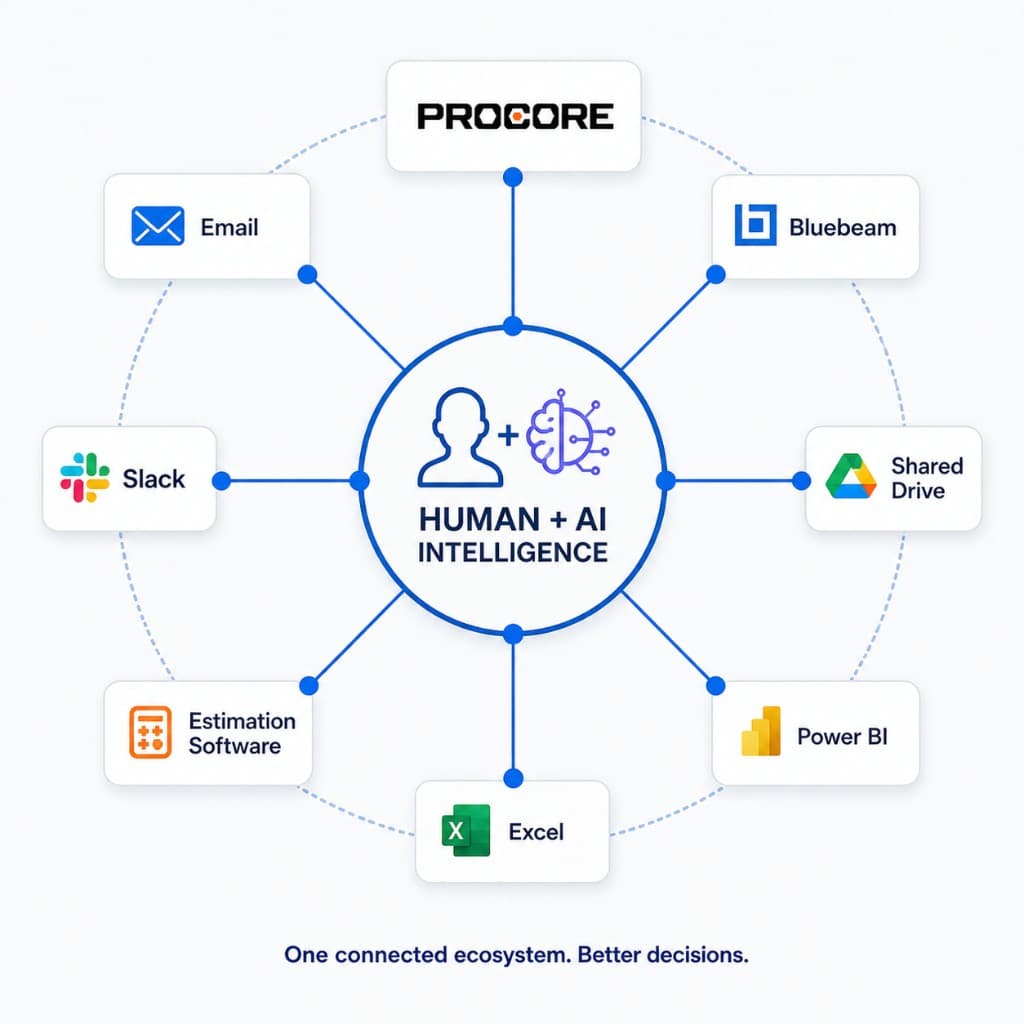
Project teams everywhere are still copying data between systems by hand. Procore to Excel. PlanGrid to SharePoint. Cost data to the accounting system. Submittal status to a weekly report the PM rebuilds every Friday morning.
It's tedious. It's error-prone. And it's doing real damage to the time your PMs and PEs have for actual project work.
The connectors to fix it already exist. That's the part most teams haven't internalized.
Narrowing Down From "Integration" to What You Actually Have
Forget the abstract conversation about "integrations." Look at what specifically is sitting on the shelf.
Procore exposes a REST API called Procore Connect with OAuth 2.0 auth.
In plain terms:
- API (Application Programming Interface) = a way for one system to talk to another without a person in the middle
- REST API = a common, structured way systems send data back and forth over the internet
- OAuth 2.0 = a secure login handshake that lets systems connect without sharing passwords
What that means in practice: another system can safely read from and write to Procore automatically.
You can pull and push project management, drawings, documents, quality and safety, financials, and directory data. The Procore App Marketplace hosts third-party integrations. A developer portal lets you build custom apps with sandbox testing before production (a safe test environment before touching real project data).
Autodesk Construction Cloud—Build, BIM 360, PlanGrid—offers ACC Connect, a code-free integration platform.
Plain version:
- Code-free / no-code = you can connect systems using a visual tool instead of writing software
- Integration platform = a hub that moves data between systems automatically
It connects across Assemble, BIM 360, BuildingConnected, and PlanGrid, and outbound to Box, Smartsheet, DocuSign, QuickBooks Online. Autodesk reports 140-plus direct integrations across the construction ecosystem.
Data connectors from providers like Toric pull project data—files, cost items, RFIs, tasks, submittals—from Procore and Autodesk Build for transformation, reporting, and visualization with daily refreshes.
Plain version:
- These tools act like a central data layer—they collect information from multiple systems, clean it up, and present it in one place
- Daily refresh = the data updates automatically without someone exporting/importing files
This isn't a vendor pitch. This is what your firm has access to today, often through licenses you're already paying for.
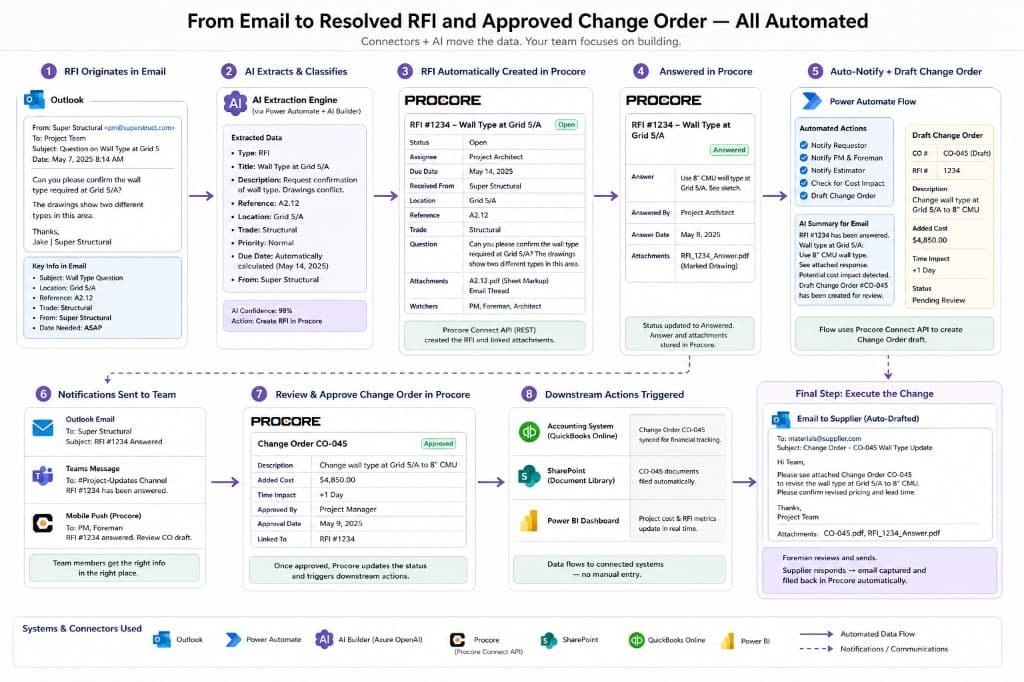
What a System Can Actually Do Today (Not Theory)
This is where most teams underestimate what's possible. These platforms aren’t just “data storage.” They already support real actions—create, update, route, notify—without human involvement.
Procore – Actions Available Today
A system connected to Procore can:
RFIs
- Create & update RFIs
- Generate draft RFIs from emails or notes
- Assign to responsible parties
- Track status changes automatically
Submittals
- Manage submittals
- Create submittal packages
- Route for approval (automatically send to the next reviewer)
- Update statuses and due dates
Cost events & change orders
- Create cost events from field issues
- Push approved change orders into accounting
- Sync budget updates
Drawings & documents
- Upload new drawings
- Version and supersede sheets (mark old drawings as outdated automatically)
- Attach RFIs/submittals to drawings
Daily logs & observations
- Create logs from field inputs or sensors
- Auto-fill weather, manpower, and notes
- Generate safety observations
Directory & permissions
- Sync contacts from CRM/Outlook
- Update roles and permissions
Notifications & workflows
- Trigger emails when statuses change
- Escalate overdue items automatically
All of this is available through API or marketplace tools—not custom software from scratch.
Autodesk Construction Cloud (Build / BIM 360 / PlanGrid)
A system connected to ACC can:
Issue management
- Create issues from field reports or images
- Assign and track resolution
- Auto-escalate overdue items
Submittals & RFIs
- Create and route submittals
- Track approvals and revisions
- Sync RFI logs to external systems
Document control
- Upload and version files
- Enforce naming standards
- Sync to SharePoint or Box
Model coordination (BIM 360)
- Flag clashes (when systems physically conflict in the model)
- Assign coordination issues
- Track resolution workflows
Cost management (Build)
- Create budget items
- Track changes and forecasts
- Sync with accounting tools
Forms & field data
- Auto-generate safety forms
- Collect structured field inputs
- Route for approval/signoff
Microsoft Stack (Power Automate + SharePoint + Excel + Outlook)
This is where most firms already have hidden leverage.
Plain version:
- Power Automate = a workflow engine that connects apps and runs rules (“if this happens → do this”)
- SharePoint = document storage and internal file system
- Excel = still the most common system of record whether people admit it or not
A system can:
Email ingestion
- Read incoming emails
- Extract key info (dates, trades, scope)
- Route it to the right system
Excel automation
- Populate bid logs automatically
- Update tracking sheets in real time
- Generate owner-facing reports
Workflow automation
- Trigger approvals based on conditions
- Send reminders for overdue tasks
- Route documents for signatures
Cross-system sync
- Sync Procore ↔ Excel ↔ accounting
- Maintain one source of truth across tools
Data Platforms (Toric, etc.)
These sit on top of everything and:
- Aggregate data across systems
- Standardize formats (RFIs, cost, schedule)
- Build dashboards automatically
- Run analytics (delays, cost overruns, trends)
They don’t replace systems—they eliminate the gaps between them.
Narrowing Further: What This Looks Like on a Real Job
Bid intake. ITBs and drawings flow from email or a portal into your tracking sheet and folder structure automatically. The BD analyst stops sorting attachments at 7 a.m.
But now take it one step further:
- The system reads the email
- Extracts bid due date, trade, scope
- Creates a row in Excel
- Links the drawings automatically
- Flags high-fit projects based on past jobs
No one touches it until decision-making starts.
RFI and submittal status. Procore is the system of record. The owner wants a weekly report in their format.
Instead of the PM rebuilding the report every Friday:
- The system pulls RFI/submittal data
- Formats it into the owner’s template
- Flags overdue items
- Drafts the email
The PM reviews and sends.
Cost coding. Approved change orders post from Procore to the accounting system without re-keying.
But also:
- Cost events can be created automatically from RFIs or field issues
- Budget forecasts can update based on real-time data
- Accounting is no longer waiting on project teams
Directory updates. Contact and org data stay consistent between Procore and Outlook or your CRM.
That means:
- New subcontractors auto-populate
- Role changes sync instantly
- Emails stop going to the wrong person
Narrowing Further: The Pilot You Should Run This Month
Pick one workflow. Just one.
Best candidates: a workflow that's high frequency (weekly or daily), low risk (the data doesn't move money on its own), and obvious to measure (PM saves X hours per week).
A common starting point is the weekly status report to the owner.
Currently:
- PM pulls data manually
- Formats it
- Sends it
With automation:
- Data is pulled automatically
- Report is built automatically
- Email is drafted automatically
The PM reviews and sends.
That's three to five hours a week back. On a single project. Multiply by the number of projects your firm runs and the math gets serious.
Narrowing to the Specific Risks
Field mapping. The connector is only as good as the field mapping you set up.
Plain version:
- Field mapping = matching one system’s data fields to another (ex: “Cost Code” in Procore → “Cost Code” in accounting)
If it’s wrong, the system will move bad data faster than you can catch it.
Rate limits. APIs have usage limits.
Plain version:
- Systems only allow a certain number of requests per minute/hour
- If you exceed that, some data may not transfer
Security. OAuth has to be configured by IT, not by the PM or the BD analyst.
Plain version:
- This is how systems securely “log into each other”
- Done wrong, it exposes project data
Owner restrictions. This is the one most teams miss.
Some contracts prohibit third-party data sharing entirely. The connector doesn’t care about your contract. The owner’s auditor will.
The Smaller Truth
The handoff between systems was always the bottleneck. Not the systems themselves.
Procore is fine. Excel is fine. The accounting system is fine. The friction is at the seams—the manual handoff between them.
Now those seams can be closed—and not just with data moving, but with actions being taken automatically inside the systems themselves.
Most firms haven't done the work to close them because the connectors weren't always in their licensed feature set, or because nobody has owned the integration roadmap.
That's a staffing decision, not a technology problem.
The first connector your firm ships will save a few hours a week.
The fifth one will start to feel like the firm operates differently.