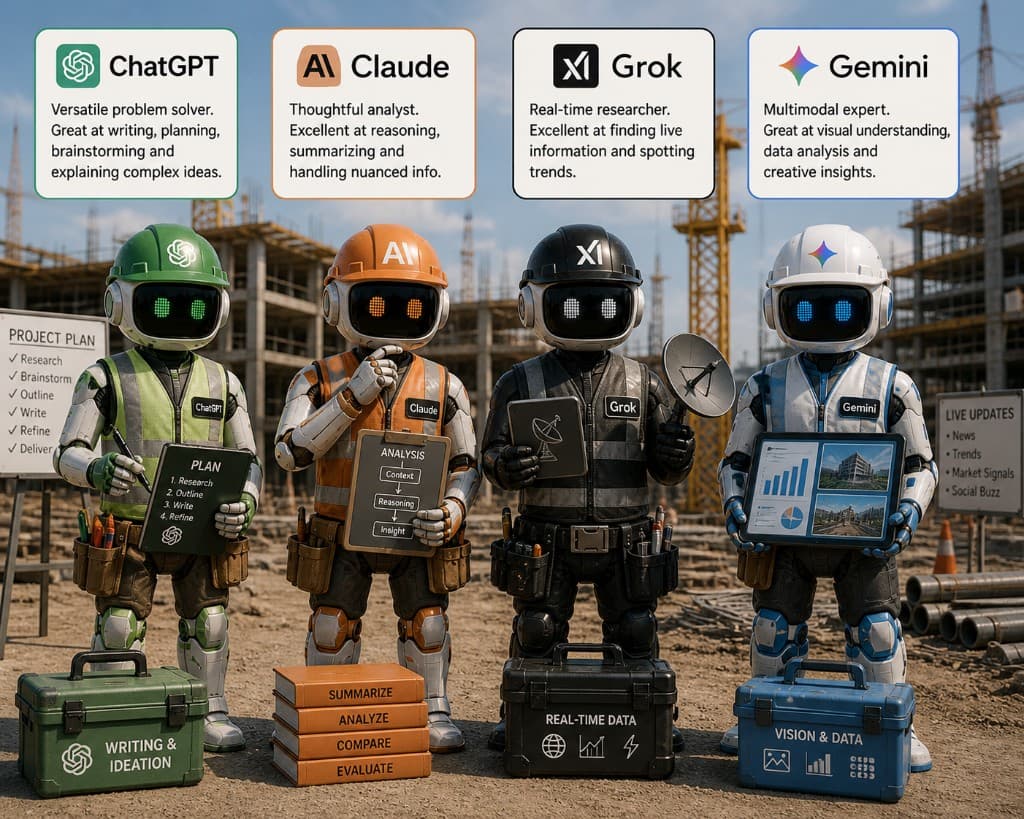
Nobody buys a skid steer to hang a door. We choose the tool by the job. Then we trust it because we've used it before, we know its limits, and we know what happens when it gets pushed past them.
AI models deserve the same approach. The mistake most teams make is treating them as a single category. They aren't. The choice between a generative model, a Microsoft 365 Copilot tied to your tenant, and an open-source model running on your own server has more in common with choosing between a forklift, a telehandler, and a crane than most construction leaders realize.
Walk through it the way you'd walk through buying equipment.
Step One: Define the Job
Most subcontractor and GC AI use cases fall into a small list. Reading plans and specs. Pulling data from RFPs and emails. Drafting proposals and clarifications. Extracting structured data from PDFs and attachments. Organizing communications. Generating safety plans, checklists, JHAs. Automating the repetitive office work that eats Fridays.
Each of these is a different job. Each pairs better with a different kind of tool.
If the job is structured—pull the bid date out of an email, file the attachment, alert the BD lead—you don't need a generative model for the whole flow. You need a deterministic process with a small piece of generative work in the middle.
If the job is interpretive—read 200 pages of specifications and tell me where the risks are—you need a generative model with a long context window and good document handling.
Step Two: Deterministic vs. Generative
Deterministic systems behave like calculators. Same input, same output, every time. Cost code lookups, unit cost calcs, takeoff formulas, file naming, routing rules. These are the parts of automation you trust without checking.
Generative models—ChatGPT, Claude, Copilot—write text, summarize documents, interpret messy inputs. They are powerful and they are not consistent. The same prompt twice can return slightly different language. That's fine for a draft. It's not fine for the cost code on an invoice.
The strongest construction automations use both. Deterministic logic moves files, applies rules, and enforces structure. Generative models do the reading and the writing in the middle. Neither one alone is the answer.
Step Three: Match the Model to the Task
A practical pairing, project by project:
- Reading messy construction documents and pulling lists. GPT-class models with strong PDF handling. Useful for RFP risk scans, scope extraction, alternates lists.
- Anything tied to Microsoft 365—SharePoint, Outlook, Excel, Teams. Microsoft Copilot or Azure OpenAI through Power Automate. Data stays in your tenant. That matters when the document includes pricing, drawings, or bid strategy.
- Sensitive cost data, proprietary assemblies, or anything an owner has restricted in the contract. Open-source models running self-hosted, or in a private cloud. Llama, Mistral, similar. Slower to set up. Total control over where the data lives.
- Internal templates, checklists, and structured inputs. Deterministic logic plus a thin generative layer for the human-readable output.
- Pursuit and proposal language. GPT or Claude for the drafting, with a strict review gate before anything goes external.
You don't have to pick one model for the whole company. Most teams that do this well pick two or three and use them where each one is strongest.
Step Four: Data Security Is Not Optional
This is the part that gets skipped because it's boring.
Every construction firm handles pricing, marked-up plans, safety reports, client names, bid strategy, and proprietary assemblies every day. Before any model touches any of that, three questions:
Where does the data go? If it leaves your environment, you need to know what's protecting it. Most public consumer chat tools are not the right home for an owner's drawings.
Can the model train on your data? Enterprise tools (Microsoft 365, Azure OpenAI) let you turn this off. Consumer tools sometimes don't, and the policies change.
Will your clients see this as a breach of trust? Some owners now write AI restrictions into the contract. Some GCs do the same. Read the contract before you upload.
These aren't theoretical. They're the questions your IT lead and your legal team should have answered before AI gets used on a project, not after.
Step Five: Don't Lock In
Models change every quarter. The one you picked last year is not the one you'd pick today. Build your automations so the model is replaceable. The flow that pulls bid dates out of emails should not be hardcoded to one specific vendor's API. The drafting tool that generates clarifications should be willing to swap from GPT to Claude to whatever's next without rewriting the workflow.
Lock in is a vendor problem dressed up as a feature. Watch for it.
The Working Test
The right AI model for a construction business saves time, doesn't introduce new risk, fits the software you already pay for, protects the data your clients trust you with, and doesn't require a full-time IT person to maintain. If a tool fails any of those tests, it's not worth the subscription, no matter how impressive the demo.
Choose the model the way you choose tools. Function first, reliability second, safety third. Let the marketing language go.