The Trade You’re Making (Whether You Realize It or Not)
The PX I work with checks LinkedIn between submittal reviews. Not because he wants to. Because a feed full of construction takes feels productive while you're waiting on the elevator vendor to call back.
Forty minutes later he's read three opinion pieces about AI and missed the price increase notice from his structural steel supplier.
That's the trade.
The Feed Doesn’t Know Your Job
Scrolling is not the same as being informed. Algorithms don't know your project mix. They know what gets clicks.
The structural steel notice is in the inbox. The takeoff for next week's GMP is in the inbox. The fabricator's two-week pull is in the inbox.
The feed knows none of that.
What a Daily Brief Actually Is
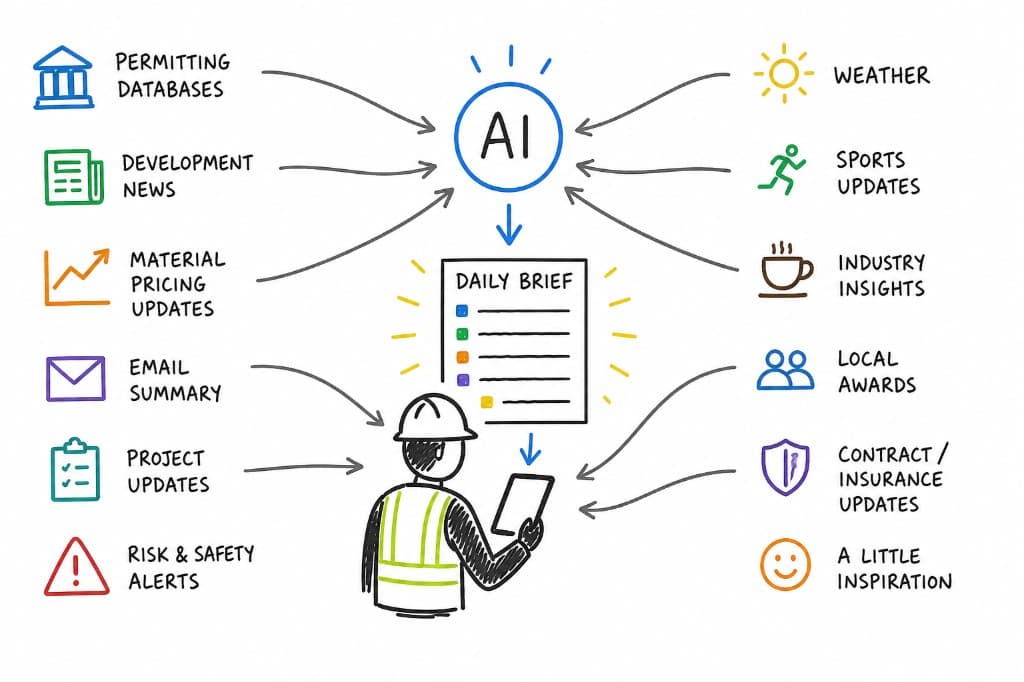
A daily brief sounds like a software product. It isn’t. It’s a rhythm.
Same structure. Same time. Every day.
What it includes:
- Pricing trends on the trades that drive your margin
- Permit and approval activity in your markets
- Schedule risks on active jobs
- Local award activity
- Contract or insurance changes buried in your inbox
Add whatever else matters—sports scores, something for your crew, even a joke.
The format is flexible.
The repetition isn’t.
Why Rhythm Beats Volume
The thing the daily rhythm gives you that scrolling can't: pattern recognition.
Steel goes up two cents. You don’t notice. Another two cents. Still nothing. Then six more.
Now you’re ten percent off and your buyout assumptions are wrong.
When the same five sections show up every morning, you don’t just read.
You compare.
The Hidden Cost Isn’t Time
The hidden cost of scrolling isn’t the hour you lose.
It’s the decisions.
Every click, every tab, every “should I read this?” adds up. By mid-morning, you’ve already spent energy that should’ve gone to actual problems.
A daily brief removes that.
It tells you what matters. You process it. You move on.
Why This Hasn’t Worked Before
Most people have tried some version of this.
A spreadsheet. A running note. Maybe a weekly recap email.
It works for a week.
Then the job picks up. Inputs get inconsistent. Data shows up half-complete—missing context, blended information, no clear signal. Cleaning it takes longer than collecting it.
So it dies.
Same pattern as every other data effort in construction.
Not because the idea is wrong.
Because the effort required to maintain it manually is too high.
What Changed
The constraint was never knowing what to track.
It was the time required to track it well.
That’s what AI removes.
Not by making the brief smarter.
By making it repeatable without adding more work to already maxed-out people.
How to Build a Daily Brief That Actually Runs
The goal is not to open a tool every morning and ask for updates.
The goal is to set up a system that delivers a short, relevant brief to you automatically.
Think of it like a personal construction newsletter.
Define Your Sections Once
Start with 5–7 categories you actually care about:
- Material pricing changes
- Local permit activity
- Project awards
- Labor and subcontractor signals
- Schedule risks
- Contract / insurance / safety updates
- One personal section (optional)
Don’t adjust this daily. The consistency is what creates signal.
Choose What the Brief Watches
This is where most of the value comes from.
Pick a small set of sources:
- Supplier emails and price notices
- Internal reports, RFIs, or schedules
- Bid board updates
- City or county permit feeds
- Industry newsletters or local business journals
- Weather alerts or labor updates
Start small. You can expand later.
Set Up Your Inputs
You need a consistent place where information flows from:
- An email folder (e.g., “Daily Brief”)
- A Teams or Slack channel
- A shared drive folder
- A running note or document
Use rules or simple habits to push information into that location.
Don’t clean it. Don’t organize it.
Just make sure it lands in the same place every day.
Use a Standing Prompt
This is the instruction that turns raw inputs into a brief.
You’ll reuse this every time.
Run It Inside Your Existing Tools
Where you do this depends on your setup:
- In Microsoft Copilot: point it at your email folder, Teams activity, or files and generate the brief from those sources
- In ChatGPT: paste or connect your inputs and run the same prompt
- In Claude: feed it longer reports, PDFs, or mixed inputs and generate the same structure
The tool doesn’t matter.
The structure does.
Deliver It Where You’ll See It
If it doesn’t show up where you already work, you won’t read it.
Send it to:
- Your email
- A Teams or Slack channel
- A shared dashboard
Same place. Same time. Every day.
Adjust It Weekly
Cut what you ignore.
Add what actually helped you make a decision.
If a section turns into noise, remove it.
Treat it like something you’re editing—not something you set and forget.
What Actually Changes
Some days the brief says nothing changed.
That’s the point.
Because the day something does change, it stands out immediately.
And you catch it before it compounds into a problem.
The Real Upgrade
This isn’t about AI.
It’s about replacing randomness with rhythm.
The information was always there.
Now you don’t have to go looking for it.